Every color, font and spacing value on a website, in one click
Stylasso reads the page you are on and hands you its style kit: the palette with roles, real samples of its fonts, the type scale, spacing, corner radius and shadows. Paste it as CSS variables, a Tailwind v4 theme, Figma tokens, or a DESIGN.md your AI coding tool can follow.
Free. Pro is $9.99 once, no subscription. Nothing leaves your browser unless you publish a share link.
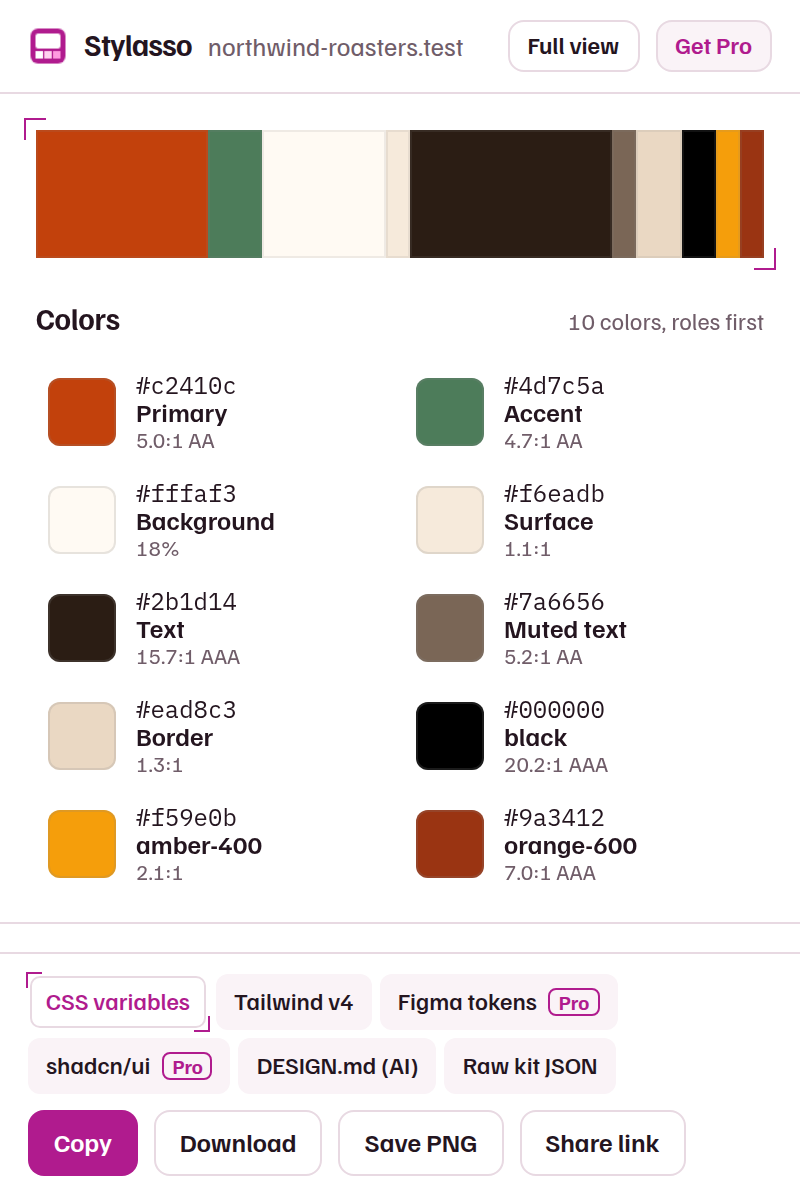
One scan, every format you paste into
Stylasso samples the rendered page, so it sees what visitors see: the colors buttons are actually painted with, the font the browser actually draws, the sizes headings actually use.
CSS variablesTailwind v4 @themeDESIGN.mdFigma tokens (W3C)shadcn/ui themeJSONPNG moodboardColors with roles
Primary, accent, background, surface, text, muted and border, picked from buttons, links, the logo and the site's own CSS variables. Each with its contrast ratio.
Fonts as they render
The face the browser draws, not the first name in a font stack, with a sample drawn on the page itself, its weights and where it loads from.
Type, spacing, shape
A type scale named in Tailwind steps, the spacing grid, corner radii, shadows and gradients.
Logo and icons
Inline SVGs with their colors baked in, ready to paste. Copy one, or download them all as a ZIP with Pro.
A DESIGN.md your AI coding tool can follow
Ask Cursor, Claude Code, v0 or Lovable to build "in the style of" a site and they guess. Give them the DESIGN.md Stylasso writes and they get exact tokens: colors, type levels, radii and component hints, in the open DESIGN.md format from Google Labs. Every export passes that format's official linter.
---
version: alpha
name: "Northwind Roasters"
description: "Visual style of http://northwind-roasters.test/, extracted 2026-11-07."
colors:
  primary: "#c2410c"
  secondary: "#4d7c5a"
  neutral: "#fffaf3"
  surface: "#f6eadb"
  on-surface: "#2b1d14"
  on-surface-variant: "#7a6656"
  outline: "#ead8c3"
typography:
  headline-display:
    fontFamily: "Fraunces"
    fontSize: 64px
    fontWeight: 600
  ...
---
What stays in your browser
Stylasso reads styles only when you click its icon, and only on that tab. It reads computed styles, CSS variables, font names and inline SVGs; it does not read or keep the page's text. Saved kits stay in your browser's extension storage.
Two things ever leave your device. When you press Publish on a share link, the kit's colors, font names and samples, type scale, spacing, radius, shadows and the page address (without its query string) are uploaded to make that public page. If you buy Pro, your license key is checked with our payment provider, Dodo Payments. Stylasso shows no ads, runs no analytics and never changes the pages you visit.
Free for what free tools do, Pro for pipelines
| Free | Pro, $9.99 once | |
|---|---|---|
| Colors, fonts, type scale, spacing, radius, shadows, icons | Yes | Yes |
| CSS variables, Tailwind v4, DESIGN.md, JSON | Yes | Yes |
| Public share link | Yes | Yes |
| PNG moodboard | With a small "Made with" tag | Without the tag |
| Figma tokens (W3C design tokens) and shadcn/ui theme | No | Yes |
| All logo and icon SVGs as one ZIP | No | Yes |
| Saved kits | Last 5 | 100 |
One key works on up to 3 browsers. 14-day refund, no questions asked. Get Pro
Questions
Is it OK to use another site's colors?
Colors, sizes and spacing values are facts about a page, and designers study them all the time. Logos, illustrations, photos and text belong to their owners: Stylasso never exports page text or images, and its DESIGN.md tells your AI tool not to copy logos or content. This is not legal advice.
Does it name the exact font?
It reports the font the browser actually renders, with a sample drawn on the page. Commercial fonts still need a license from their foundry; Stylasso never downloads or shares font files.
Why does it not work on some pages?
Chrome and Edge block extensions on their own pages, the Web Store and the PDF viewer. Everywhere else, one click on the icon is enough. Very large pages are sampled from the first 8,000 elements.
Why does it not ask for access to all websites?
It does not need it. Clicking the icon gives Stylasso access to the current tab until you leave it, which is all a scan needs.
Does it work in Edge?
Yes, with the same features and the same Pro key.